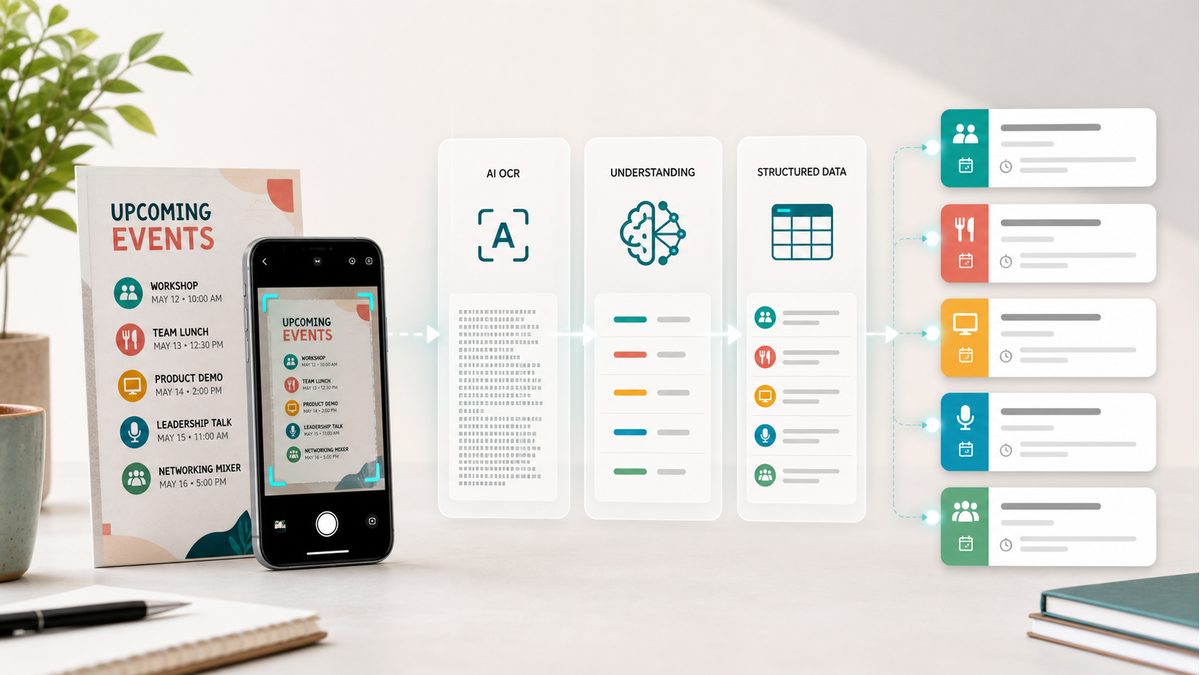
When you photograph an event flyer, your phone sees millions of pixels. But how does AI turn those pixels into a structured calendar event with a title, date, time, and location? Let's look under the hood.
What Is OCR?
OCR (Optical Character Recognition) is the technology that converts images of text into machine-readable text. It's been around for decades — your phone's camera app uses it to recognize text in photos. Traditional OCR extracts raw text, character by character.
But raw text isn't enough for calendar extraction. Knowing that an image contains '15 March 2026 at 3:00 PM' is only useful if the system understands that this represents an event date and time, not just a string of characters.
How AI Goes Beyond Traditional OCR
Modern multimodal AI does not just read text — it interprets context. When analyzing an event flyer, the AI can recognize that 'Saturday, March 15' is a date, 'Community Center' is a location, and 'Jazz Night' is an event title. It then relates those pieces of information to one event.
This contextual understanding is what makes AI-powered calendar extraction so powerful. The AI can handle messy layouts, decorative fonts, multiple languages, and even handwritten notes — things that would confuse traditional OCR systems.
The Extraction Pipeline
Image Analysis: The AI receives your photo and identifies text regions, layout structure, and visual hierarchy
Content Understanding: It reads the text and understands what each piece means — dates, times, locations, titles, and descriptions
Event Structuring: The AI groups related information into discrete calendar events, handling multiple events from a single image
ICS Generation: Structured event data is converted into the universal ICS (iCalendar) format compatible with Google Calendar, Outlook, and Apple Calendar
Common Challenges and How AI Handles Them
Real-world images are messy. Event flyers use decorative fonts, tilted text, overlapping graphics, and creative layouts. Photos may be taken at angles, in low light, or with motion blur. AI models are trained on millions of diverse images, making them robust against these real-world conditions. They can extract accurate event data from images that would be impossible for traditional OCR systems to process.
The Future of AI Calendar Extraction
As AI models continue to improve, expect even better accuracy with handwritten text, complex multi-language documents, and low-quality images. Future developments may include real-time extraction from video, voice-to-calendar conversion, and proactive event suggestions based on your photo library.
Try AI-Powered Calendar Extraction
PhotoCalia uses a server-configured multimodal AI provider for calendar extraction. Upload an event flyer, appointment card, or schedule, then review the proposed events — it is free to try with 3 conversions per month.
Related guides: follow the practical tutorial to convert a photo to Google Calendar, see examples for paper schedule digitization, or review the product flow on how PhotoCalia works.